


Online, Local, or Institutional AI: Choosing the Right Engine for Secure Text Analysis August 4, 2026 - Blogs on Text Analytics
Generative AI is changing how researchers, analysts, businesses, and institutions work with large volumes of text. Summarizing documents, assisting qualitative coding, extracting themes, classifying responses, and transforming text collections can become much faster when text analysis software connects directly to an AI engine.
But the choice of AI engine is not only about performance. For research, it also raises questions of privacy, security, reproducibility, transparency, and cost.
Why Not Just Use the Web Interface?
Web interfaces such as ChatGPT, Claude.ai, Gemini, and Mistral Le Chat are excellent for everyday use, brainstorming, and exploratory work. For a quick question or a small amount of text, they may be all you need. Systematic research, however, requires a more controlled workflow.
In a chat interface, the response may be influenced by more than the current prompt and the underlying model. It may also be affected by previous messages in the same conversation, earlier answers, inferred user preferences, personalization or memory features, and the model’s tendency to adapt to what it believes the user wants. This can be helpful in conversation, but it creates methodological problems when the goal is to apply the same analytical procedure consistently across a corpus.
Two identical excerpts may receive different treatment if they are submitted at different points in a chat session, after different clarifications, or after the researcher has implicitly steered the model. The analysis can gradually become less like a standardized procedure and more like an evolving conversation shaped by the researcher’s expectations.
Using API calls inside specialized software provides a more controlled approach:
- Scale and automation: large collections of documents or text segments can be processed systematically, without manually copying and pasting each item into a chat window.
- Privacy and security control: organizations can decide which online provider, local engine, or institutional server is allowed for each type of data.
- Reproducibility: the same prompt, model, parameters, and processing rules can be applied across all documents or text segments and documented as part of the research method.
- Auditability and transparency: prompts, model choices, settings, outputs, and usage can be recorded with the project, making it easier to inspect, explain, repeat, or challenge the analysis.
- Reduced interactive bias: the researcher can define instructions in advance and apply them consistently, instead of adjusting prompts case by case after seeing individual answers.
A related transparency issue can arise when AI features are implemented as a black box inside software. If users do not know which model is being used, which provider processes the request, or what prompt instructions are sent behind the scenes, it becomes harder to evaluate, reproduce, or explain the results. For research, the AI workflow should be as explicit as possible.
Three Ways to Use AI for Text Analysis
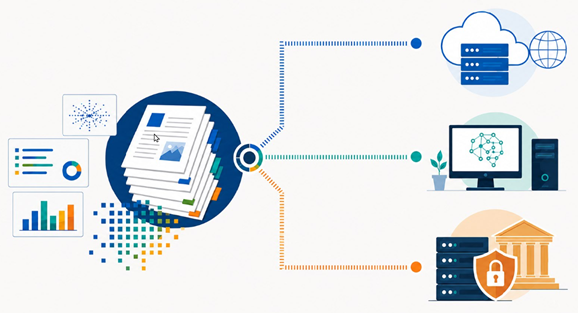
With WordStat and QDA Miner, users can choose among online AI services, local AI engines, and institutional or custom OpenAI-compatible servers. This flexibility makes it possible to match the AI setup to each project’s methodological, privacy, and budget requirements.
Option 1: Online AI Services
Online services such as OpenAI, Google Gemini, Anthropic Claude, or Mistral are often the easiest to configure. They give access to powerful, regularly updated models without requiring users to install an AI engine locally.
This option works well when ease of use and model quality are priorities. Users should also remember that a web subscription, such as ChatGPT Plus or Claude Pro, does not necessarily include API access. API billing often has to be enabled separately.
Option 2: Local AI with Ollama or LM Studio
Local engines such as Ollama and LM Studio run models directly on the user’s computer. This can be attractive for sensitive projects because prompts and responses can remain on the local machine.
The trade-off is performance and setup. Larger models require significant memory and run much faster with a capable GPU and enough dedicated VRAM. Local AI is therefore best suited to users who need local control and have appropriate hardware.
Option 3: Institutional Servers and LiteLLM Gateways
Many organizations want to support AI while maintaining control over data, approved models, logging, access rules, and costs. They may provide an institutional AI server or an OpenAI-compatible gateway, sometimes using LiteLLM, which can be installed on many server platforms to provide compatibility.
In most cases, users only need the server URL, the API key if required, confirmation that OpenAI-style API calls are supported, and any privacy or network access rules. WordStat and QDA Miner can save up to three custom server URLs, making it possible to keep a production institutional server, a test server, and a local server available at the same time.
Data Privacy: Where Does Your Text Go?
AI prompts may contain project text, documents, codes, interview excerpts, research notes, customer feedback, legal material, medical content, or other sensitive information. Before using an external AI service, users should confirm that this is allowed by organizational policies, research ethics protocols, client agreements, and applicable data protection rules.
A local engine can reduce some risks because data does not need to be sent to an external provider. An institutional server can also provide a strong compromise by allowing the organization to define approved models, access rules, logging policies, and security controls.
For a closer look at what privacy claims such as zero data retention, no training on your data, and encryption actually mean in practice, see our analysis of common data privacy and security promises in generative AI.
Cost: Paying for AI Access vs. Paying for Actual AI Usage
Some qualitative analysis software products charge around $250 per year simply to enable access to AI features. In many cases, those systems are still using commercial AI APIs behind the scenes. The user pays an annual fee for access, regardless of how much AI processing they actually need.
With WordStat and QDA Miner, users can connect directly to their own AI provider, local engine, or institutional server. Instead of paying a fixed annual AI access fee to the software vendor, the budget can be used directly for actual AI processing.
This matters because many qualitative research projects are relatively small. For common tasks such as summarization, code suggestions, classification, theme extraction, or rewriting short passages, smaller and less expensive models may often be sufficient. With current API pricing, a $250 budget can represent a very large amount of AI processing, potentially several hundred thousand pages of text. For most qualitative researchers, that is far beyond the amount of text they would normally analyze in a year.
The advantage is control: users choose the provider, the model, and when AI is needed. They can use lower-cost models for routine tasks, reserve larger models for more complex analyses, and pay for actual usage instead of paying an annual access fee for a black box AI implementation. This avoids hiding the provider, model, prompt, and cost structure from the researcher.
Comparison Table
| Option | Best for | Data Privacy | Setup | Cost |
| Online AI service | Simplicity and powerful models | Data is sent to the provider | Easy | Pay per use |
| Ollama / LM Studio | Local control and sensitive data | Data remain on the computer | Moderate | No API cost, but hardware required |
| Institutional server / LiteLLM | Organizations with internal policies | Controlled by the institution | Moderate | Depends on the organization |
Final Thoughts
AI integration for text analysis should not lock researchers into a single provider, a single model, a hidden workflow, or a fixed annual subscription. An exploratory project may benefit from a fast online model. A confidential project may require a local engine. A university, company, hospital, or government agency may prefer an institutional OpenAI-compatible server, often through a gateway such as LiteLLM.
WordStat and QDA Miner are designed to support this flexibility: online AI services, local engines such as Ollama and LM Studio, and up to three custom OpenAI-compatible server URLs. This allows users to choose the right balance of performance, cost, privacy, transparency, and control for their own text analysis needs.